Part 2 ended on the number that matters: allocated versus busy. A GPU that is allocated to one pod and busy 15 % of the time is the norm for anything interactive — notebooks, small models, dev environments. Sharing is how you close that gap. There are three ways to do it, and they are not interchangeable.
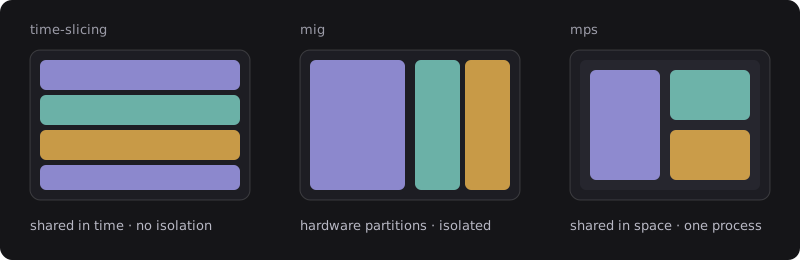
The device plugin advertises each physical GPU as N virtual ones. Pods land on the same card and the driver context-switches between them, like processes on a CPU. There is no memory isolation: one pod can exhaust the card’s memory and take the others down with it.
Best for: notebooks, dev clusters, anything where a crash is annoying rather than expensive.
Multi-Instance GPU carves an A100/H100 into up to seven hardware-isolated partitions, each with its own memory and compute slices. A partition looks like a small GPU to the pod. The layout is fixed per card and changing it needs the card to be idle.
Best for: multi-tenant inference with SLOs, anything where one tenant must never affect another.
The Multi-Process Service lets several processes share one CUDA context so kernels from different pods run concurrently instead of taking turns. Highest throughput of the three, but every client lives inside one server process, so one fault can bring down all of them.
Best for: many small inference replicas of the same model, owned by one team.
Choosing
The table is the short version; the sections below are the scars.
| Strategy | Isolation | Overhead | Reconfigure | Hardware |
|---|---|---|---|---|
| Time-slicing | none | low | live | any |
| MIG | hardware | none | needs idle GPU | Ampere+ |
| MPS | process | lowest | restart server | Volta+ |
Where each one hurt
Time-slicing looked free until a notebook loaded a 30 GB model onto a card three other people were sharing. All four kernels died with the same out-of-memory error, and only one of them deserved it. We kept time-slicing for the dev cluster and added a memory limit sidecar that kills the offender first.
MIG delivered exactly the isolation it promised and exactly none of the flexibility. A card sliced into 7 × 10 GB partitions cannot run a 40 GB model until every partition is drained and the layout is rewritten. We settled on two fixed layouts per node pool and route by label.
MPS gave us a 2.3× throughput improvement on a batch of small embedding models, then took the whole batch down when one replica segfaulted. It stays enabled for exactly one workload, owned by one team, who understand the trade.
What we actually run
pools: - name: dev-timeslice # notebooks, experiments strategy: time-slicing replicas: 4 - name: inference-mig # multi-tenant serving strategy: mig layout: 3g.40gb x2 - name: embeddings-mps # one team, one model, many replicas strategy: mps activeThreadPercentage: 25Three pools, three strategies, one rule for choosing between them. The GPU utilisation graph went from a flat 18 % to a jagged 60–70 %, and the finance team stopped emailing me about it.
That is the end of the series. If you want the operator that watches those graphs and pauses rollouts when they go wrong, that is Rollout Sentinel.